Home » Posts filed under Computer
Posted by
Unknown on Sunday, October 28, 2012

Desktop computers are divided into two, namely assembly and built up. Computer
assembly means we pick the latest computer parts or components that we
want then we raft into one entity that has the latest computer functions
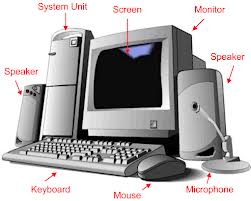
completely. Computers built up means that we buy so a computer that has been assembled by the vendor or a specific company. So buy a computer built up exactly like buying a tv.Then, why we should be spending on computer assembly? Would it be good yah? The answer is yes and no. Computer assembly has more value on flexibility. Depending on the thickness desired features our pockets. The thicker, wider choices. Price computer assembly is also quite cheaper and affordable.Computers built up is more simple when buying, but the price pc built up are usually more expensive. With the same specs, pc assembly can be cheaper 40% - 50% rather than pc built up. Excess expenditure pc computer built up the most significant is a longer life and are usually included genuine windows software.Check list when buying pc parts:ProcessorThe most common option is currently amd and intel. Amd offer exceptional performance especially for graphics, while Intel reliable for all needs. More processor options to the tastes and needs. If you like playing games and design, especially the 3d; amd steady. If for office, everyday use, for the server, or a cafe, wrote intel that's easy to use.MotherboardThis is the only confuse him. Its brand as well as a variety of features. What is clear what the seller asks the same motherboard compatible with the processor of our choice as above.Vga cardVga card determines image quality and usually for 3d graphics rendering. There are two ports for vga, pci-express (pci-x) and agp. Pci-x is the latest technology and offers 2 times the agp speed. Usually pci-x has been widely available in the latest motherboards. But if it is only used for office work, agp is more than enough. And if you are giving a limited, vga card for this can be ignored if your motherboard has a built-in VGA card (VGA on board).MemoryMemory or RAM is a temporary storage area high speed. Currently available in the market is kind of DDR-1, DDR-2, DDR-3. Check to see if your mobo supports it. Ddr-2 clearly faster than ddr-1 at a price not much different, DDR-3 faster than DDR-2 and the price is cheaper.
Posted by
Unknown
Tips on buying computers and computer assembly builtupConfused as to buy Computer builtup or assemblies? I'll give a little explanation tip to buy a PC built up and Assembled PC. In general there are two types of personal computers (PCs) are often offered to the user, ie Builtup and Assembled PCs.PC
can be interpreted builtup Computer (PC) or computer software which
have become a series of components and accessories have come other
computer devices, and the user just stay put on it. Meanwhile,
computer assembly, which is a computer that is separate components and
peripherals, users are free to choose computer components and
peripherals to their liking and also according to the needs and
abilities of the funds to buy it.
Here are some tips for you.Some tips on choosing a computer / PC and the Assembled builtup- Choose a brand leading product and vendor that clearly guaranteed quality.- Preferably choose a PC product, component or accessory PC content clear and comes with a warranty card.- Compare product prices between stores one with the other stores.- Select the component content in accordance with the specifications you need. Usually every product there is a list of the specifications of the components ..Here's a little explanation about the content of the components of a computer;
Processor.There are 2 types of processors that AMD and Intel, both have their respective advantages. AMD
reliable when used for graphics, AMD specifically more emphasis on one
of the application process that runs while the intel reliable for all
needs.
Motherboard.There
are various types and brands of motherboards, but it is better to
select the type of motherboard that already has a big name, so that if
one day there is damage, it would be easy to claim on the warranty, such
as ASUS, MSI, Intel and Abit.
VGA.VGA determine the quality of the graphics (images) generated on your screen. There are 2 ports for VGA, the PCI-Express (PCI-X) and the AGP. PCI-E / PCI-X is the latest technology and offers 2 times the speed of AGP.
Memory.Memory is also called RAM is a high-speed temporary storage. Currently available in the market is kind of DDR-2, DDR-3. Check if the motherboard supports it or not. DDR-3 clearly faster than DDR-2 at a price that is not much different
Hard drive.If you support or suport Motheboard SATA, do not hesitate to use the SATA ports. Port IDE length less ergonomic and less rapidly than SATA. The price is also not much different.
Sound Card.Most motherboards now come with a built-in soundcard. So chances are you do not have to buy it. Unless
you are a professional in the field of music or music lovers, you can
buy a soundcard add on a much more reliable as Soundblaster Aufigy.
Power Supply.Be sure to buy a power supply (PSU) is reliable, because the PSU is not optimal, will affect and damage other components.
AccessoriesCD-ROM/DVD-ROM,
CDRW / Combo / DVD-RW, Speaker, Monitor, Casing, UPS, Camera, Mouse,
Keyboard and so on, up to you, as adjusted to your taste. Whatever the brand, will not affect the performance or the speed of the PC that you buy.Well,
after you buy the product builtup PC or PC assembly which has been
arranged, you live to install the Operating System (OS) such as Windows
or Linux, and computer software applications to suit your needs. Wear
is always the OS and application software are legal so your PC will be
durable and long lasting, and also prevent the virus which sticks to the
software applications. That way you will be satisfied with the product choice.
More about → Tips on buying computers and computer assembly builtup
Posted by
Unknown
One of the most regrettable thing people are buying the wrong computer. When you buy a computer you might be blown away by the sophistication of the computer at the dealer. But later on, you sorry for advanced features is never useless. Plus, it turns out the features that you need not even exist.To avoid these regrets, it is important to know the right computer for you. This is what I will discuss this time, tips on buying a computer.Note: The following tips are general tips. Do not discuss things that are very technical like certain brands and specifications. You decide the specifics. I just give the steps you must take to buy a computer.
1. Determine Your Funds
Decide in advance how you are going to provide the funds to purchase a computer. When you get to the computer store, keep your hold on the funds. Do not be tempted to buy a more expensive computer, unless you have a good think.
2. Define Computer Specifications
Specify the computer specifications you need. Not what you want. Do a search on the internet. You should consider are: the processor, RAM (Random Access Memory), hard drives, and video cards.Here are tips on choosing components:
a. Processor:
The higher the frequency of the processor, the better the ability.
The more cores (the brain), the better the ability. Example: Intel Core i5 better than words Intel Core i3.b. RAM:
The larger the memory capacity, the better the ability.
The higher rate of DDR (DDR1, DDR2, DDR3), the better.c. Hard drive:
The greater the capacity, the better, the more data you can save later.d. Video Card, the rules:
The higher the memory, the better.
The higher rate of DDR (DDR1, DDR2, DDR3), the better.
Ask pixel shader version of that video card. The higher the version, the better.3. Ask Other Device Information
Ask all of the other devices, including the sales package. Monitor, mouse, keyboard, port / connectivity / plug (usb, bluetooth, memory card, VGA, LAN, audio, etc.). Think about which facilities you really need.
4. Ask the computer software built
Arm yourself with the latest software update. Do not let you buy a computer with old software and not compatible (does not fit) with new software. If it gets going you will be very sorry because your computer can not use the new software. Keep in mind that the development of software today is very fast. Almost every year software developer issued a new version of the software.
5. Arm yourself with the review and make sure no guarantee
Read or ask people's opinion about the brand of computer you want to buy. Many of the reviews are good or bad? You do not want to not buy a computer that is labeled bad by many people?Make sure there is a warranty. This is very important. If at any time the computer is no problem, you will get a replacement.So simple tips for buying a computer. I hope with these tips you get a clearer picture of what computer you should buy. Or maybe you have other tips for buying a computer? If yes, give your opinion so that I and other readers acquire new knowledge.
More about → Five Tips on choosing and Buying the Right Computer for You
Posted by
Unknown

There are various types of computers. From PC Desktop, Laptop, Netbook, until Server. Which one is more suitable for us? Of course, we adjust to the needs and comforts us.To
be considered, a computer with Windows Operating System is usually 700 thousand more expensive than a non-Windows (Linux or DOS). If DOS is too primitive. Linux might say almost equal Windows. If you are just browsing the internet and using Office, Linux is enough for you. Even more convenient because it is more secure from virus problems.Actually,
for other applications such as video editing or Linux Database
Applications also good although you have to learn a programming language
that runs on Linux as Java or PHP.Desktop ComputersIf you want a powerful personal computer, the PC Desktop choice. With
casing and power are great, you can put a 4 disk the size of each 1 TB
(Terabyte) or more, 2 or more DVD writer, and so on. The number of interfaces allows you to connect to the printer, scanner (or use an all-in-one at a time), and so on.In addition, with its large, PC is not easily stolen. So it gives you a sense of security. Unless the thief is really bold and professional.The disadvantage of course is not easy to carry everywhere. Less suitable for those who always move from one place to another.In buying a computer, you should pay attention to:- Processor what? Speed is how much? I will not write here because technology evolves so quickly. What is clear to performance and your wallet, choose the middle. Not too old school, but not too new. Because of the new addition to expensive, maybe there is still good. Make sure the processor is already on the market in the last 6 months. So if there are bugs, immediately caught.
- RAM how many gigabytes? Currently about 2-4 giga size. In addition to processors, RAM also determines the speed of a computer. Although 3 GHz processor speed more, but if RAM less than 1 GB, the performance is not good. Especially if you use the latest operating systems like Windows 7 and above.- How large the hard drive? Current size of about 500 MB-1 TBLaptopFor those who are mobile, the laptop is the right choice because it is easy to carry everywhere. In
addition to excellent performance, search also laptop battery lifespan
long enough so that if there is no electricity, can still operate.Usually the laptop is still no CD / DVD Player / Writer that allows us to enjoy a movie or a song.Laptop facilities that need to be considered are: web camera, Wi-fie, USB interface, mic, and speakers.NetbookNetbook size is smaller than the laptop. If the size of a laptop screen / monitor about 14 inches to the top, the 11-inch Netbook size down. With a very light weight (less than 1 kg), it is more practical than Laptop Netbook and convenient to carry everywhere.ServerWell for companies with applications / programs used by 4 users or more should use the server.This
is because the server is often used, the quality of the components such
as the hard drive to be better than ordinary desktop PC. Even
a good server systems usually have a good back-up so that when the hard
drive is damaged, there are others who can replace the hard drive.Some
companies even have 2 servers where the Primary Server is the primary
server is used, while the back-up server if the primary server
automatically replaces damaged.
Posted by
Unknown
Consideration buy tabletsMany of us are tempted by the promotion of a touch screen tablet or computer. Indeed, the ad is so intense and crowded. Especially when coupled with discounts, installment 0%, and others. It seems every new gadget, we want to buy it. But if you have limited funds, then you need to consider carefully about the gadget that you buy. how to choose a computer. Mistakes can be fatal buy, as you yourself must know that "loose seal" that prices have gone down by 30%. Therefore, in buying a particular gadget tablet computers, it is necessary to take into account the following:
Adjust to your needsThink back, if you really need these gadgets? Do you get more benefits by using these tablets? Tablets you use for what? What you want is in the tablet? Lest you buy just because you want to look stylish only. Remember, you will only waste time and energy if you buy it for style only. At
the very least you should be able to answer these questions with a
logical answer, you just decide to buy or not based on these
considerations.
Adequacy of funds you haveThe next consideration is the issue of funding. Generally, people always want to get the best of the cheapest prices. But in the electronic world, it is hard to come by, even almost nothing. There's a price, there is quality, that's the term. If you buy a tablet, you're better off both ends of funds to buy a good quality. But if you do not enough money and just want to try it, buy the cheapest course. Purchase price and quality responsibilities responsibility will only hurt you. The existence of after-sales service and warrantyThis is another important part once you decide to buy a tablet product. You have to sort out how their after-sales service. See if the service repair center or service center they are available in your city or not. This
is to guard against unwanted tablets that you buy does not work as it
should alias damaged while still in the warranty period. Understand also what is guaranteed and what is not guaranteed in the tablet. Most important in the tablet is shown, the warranty on the screen must be considered carefully.
Problems upgrading softwareYou must understand what is supported by the software in your tablet. Suppose you buy a tablet with Android OS, which is popular today. You also have to understand about your tablet can be upgraded to the version number. Not fun course if you have to use the Android OS type long, while your friends get a new type of upgrade. The
development of Android OS so fast, so if it is not supported by a good
manufacturer, the tablet you will surely outdated even before you
existed among friends there.In addition to this, you need to consider the specifications of the processor, RAM and storage capacity. Besides the physical material for the casing is also noteworthy. This is to ensure the overall quality. How could the quality of the tablet is good if the casing just haphazard, rude and not nice? Therefore you must carefully before buying.
More about → Tips on choosing a touch screen tablet computer is good
Posted by
Unknown

All people must have played the game, well beyond their spare time and for those who are 'gaming freak'. Well, when thinking about the game, you might think about game consoles such as Xbox, PlayStation, or Nintendo.
To play the game with the picture quality and maximum sound, you actually need a computer that supports the specification.
Here are three tips that you should consider before buying a computer gaming.
1. Choose the design according to taste
computer game, kind of all sorts, like a mini computer, all-in-one computer or regular computer is not really different. It's just an all-in-one computer and minicomputer has advantages in terms of portability. But the most important is a high definition monitor so that images appear smoother.
2. Powerful engine and graphics card
In every gym, there must be a minimum requirement specification to be played. If you want to play with maximum settings, meet the recommended requirements. By doing so, you are obliged to reorganize the contents of the computers with sophisticated machines. Choose a graphics card that can also display images without disabilities.
3. Data storage and RAM
Do not forget, always provide the memory storage capacity of a relief, at least 500 GB. In addition to games supporting data, the stored data can take up hard drive space. For RAM, buy a minimum size of 4 GB.